> For the complete documentation index, see [llms.txt](https://docs.resifactory.net/llms.txt). Markdown versions of documentation pages are available by appending `.md` to page URLs; this page is available as [Markdown](https://docs.resifactory.net/readme.md).
# Welcome
Everything you need to read your mailboxes, connect a tool over IMAP, and manage the credentials you bought.
The mail server gives you one place to read every mailbox you own — through a web console in your browser, and through **IMAP** for any tool that reads email automatically.
You do not run any software, install anything, or configure a server. You sign in, create one credential, and point your tools at it.
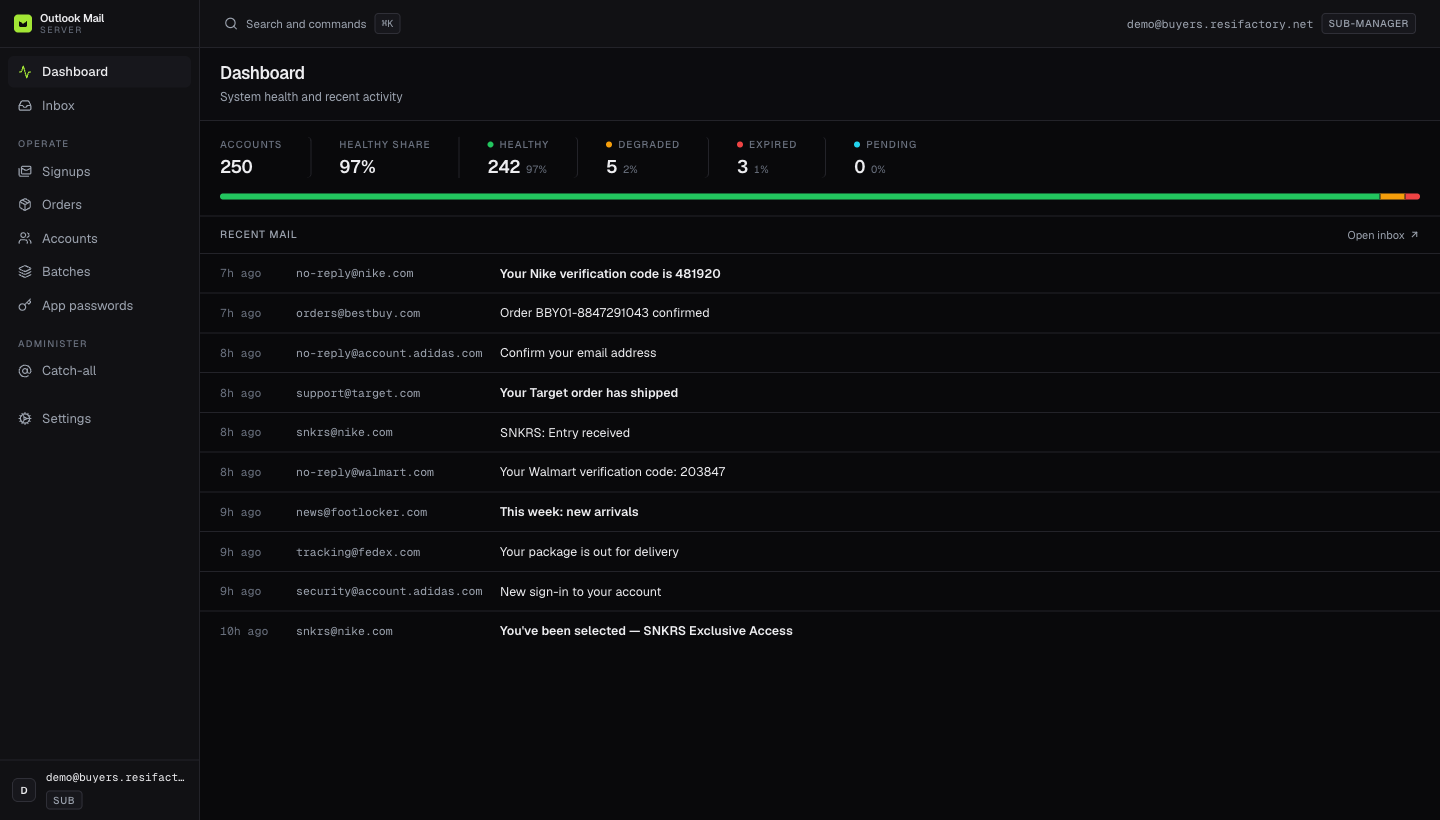
The dashboard is the first thing you see after signing in.
## What you can do
| | What it means |
| --------------------------------------------------------- | --------------------------------------------------------------------------------------------------------- |
| [**Read your mail anywhere**](/the-console/inbox.md) | Every mailbox you own, merged into one inbox, in the browser or in your own client. |
| [**Connect over IMAP**](/imap/imap.md) | One host, one port, one credential. Works with Refract, Shikari, AYCD, Thunderbird and your own scripts. |
| [**Get your credentials out**](/credentials/exporting.md) | Download or copy the logins and passwords for the mailboxes you bought, in the format your tooling wants. |
| [**Follow orders and signups**](/the-console/orders.md) | See what your mailboxes are actually receiving — order tracking, confirmations, wins. |
## Start here
If you have just been given access, the fastest path is the quick start — it takes about five minutes and ends with a working IMAP connection.
{% content-ref url="/pages/cqswZkw9yDS174m31xWu" %}
[Quick start](/getting-started/quick-start.md)
{% endcontent-ref %}
## Two recommendations before you begin
These two settings prevent the majority of support questions. Both live on the same screen and take a few seconds to set.
{% hint style="success" %}
**Always use an app password, and always set an inbox window on it.**
An app password is a separate credential for IMAP — it is not your sign-in password, it can be revoked on its own, and it is the only thing your tools ever need to hold. Setting an **inbox window** on it limits what that credential serves to recent mail, which is what makes verification codes arrive in seconds rather than getting buried behind months of old mail.
See [App passwords](/imap/app-passwords.md) and [The inbox window](/imap/inbox-window.md).
{% endhint %}
{% hint style="info" %}
**Using** [**Shikari**](https://shikari.tech)**?** Set a **smaller** window — we recommend **15 minutes**. Shikari polls the inbox hard while it waits for a code, and a tight window keeps every one of those reads small and fast. See [Shikari](/imap/clients/shikari.md).
{% endhint %}
{% hint style="warning" %}
**Using Refract?** The IMAP server must be entered **with the port attached** — type `mail.resifactory.net:993`, not `mail.resifactory.net`. Refract will not connect properly otherwise. See [Refract](/imap/clients/refract.md).
{% endhint %}
## How to read these docs
* [**Getting started**](/getting-started/quick-start.md) — sign in, find your way around, get connected.
* [**IMAP**](/imap/imap.md) — the largest section. Connection settings, app passwords, the inbox window, scopes, per-client setup, and what the server supports.
* [**The console**](/the-console/dashboard.md) — every screen, every filter, every button.
* [**Credentials**](/credentials/exporting.md) — getting your logins out, and keeping them safe.
* [**Reference**](/reference/faq.md) — FAQ, glossary, and the limits worth knowing.
Use the search box at the top of any page, or **Ask** for a direct answer.
---
# Agent Instructions
This documentation is published with GitBook. GitBook is the documentation platform designed so that both humans and AI agents can read, navigate, and reason over technical content effectively. Learn more at gitbook.com.
## Querying This Documentation
If you need additional information that is not directly available in this page, you can query the documentation dynamically by asking a question.
Perform an HTTP GET request on the following URL with the `ask` and `goal` query parameters:
```
GET https://docs.resifactory.net/readme.md?ask=&goal=
```
`ask` is the immediate question: it should be specific, self-contained, and written in natural language.
`goal` is what the user is ultimately trying to achieve, the reason they need the answer. Sharing it helps GitBook give you a better, more relevant answer. A goal is most helpful when it describes the outcome the user wants rather than restating the question. For example, with `ask=how do I create an API token`, a goal like `build a script that syncs our docs to a CMS` lets GitBook tailor the answer to that use case.
The response will contain a direct answer to the question and relevant excerpts and sources from the documentation.
Use this mechanism when the answer is not explicitly present in the current page, you need clarification or additional context, or you want to retrieve related documentation sections.